Quick Answer: What Does WhatsApp Order Automation Do?
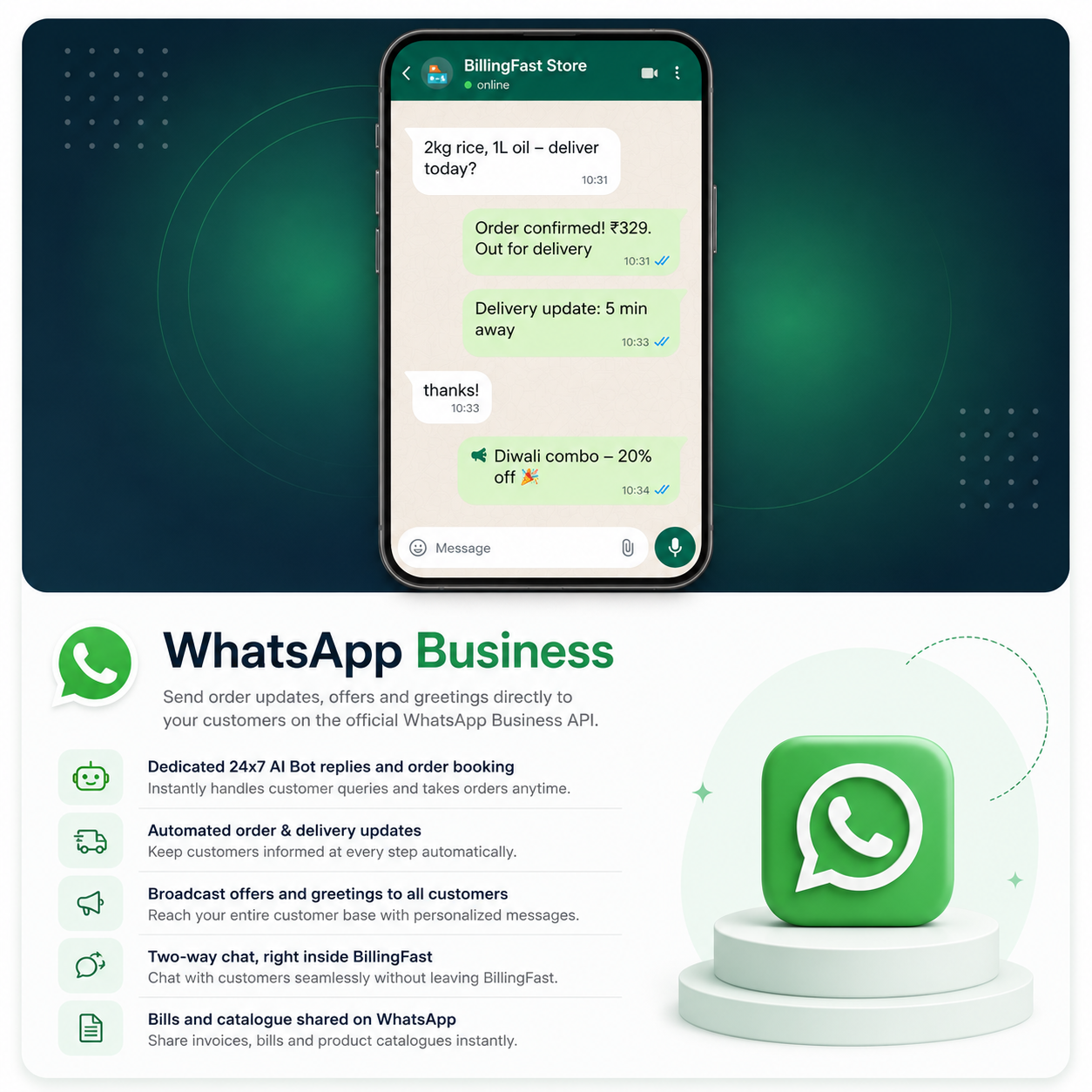
WhatsApp order automation lets Billing Fast reply to your customers and take the whole order without you typing a word. When a customer messages your shop, the bot works like an AI salesperson, not a dumb chatbot: it greets them, offers tappable buttons like "Browse Products / Place Order / Store Info", searches your live catalog for exactly what they want, and shows the real price, unit, and product photo. It builds a cart, confirms an itemised total, asks pickup or delivery, generates a UPI QR with the exact amount, and sends an invoice the moment payment lands. It even reads a photo of a handwritten shopping list. You keep billing at the counter; WhatsApp keeps selling in the background.
Why WhatsApp Orders Are Slipping Through the Cracks
In India, the order doesn't start on a website — it starts on WhatsApp. Roughly 78% of Indian SMBs already use WhatsApp for business, and conversational commerce is on track to make up around 20% of all Indian e-commerce by 2026. The catch is speed. A customer who types "aloo, pyaaz, 1kg atta — deliver ho jayega?" wants an answer now. If you're mid-bill with three customers at the counter, that message waits 20 minutes, and by then they've ordered from the shop that replied first.
The usual fixes don't hold up. A basic auto-reply ("We'll get back to you soon") answers nothing. A generic chatbot doesn't know your prices or stock, so it either guesses or sends the customer in circles. And hiring someone just to watch WhatsApp all day isn't realistic for a small shop. What you actually need is a reply that knows your catalog and can close the order — which is exactly the gap Billing Fast's automation fills.
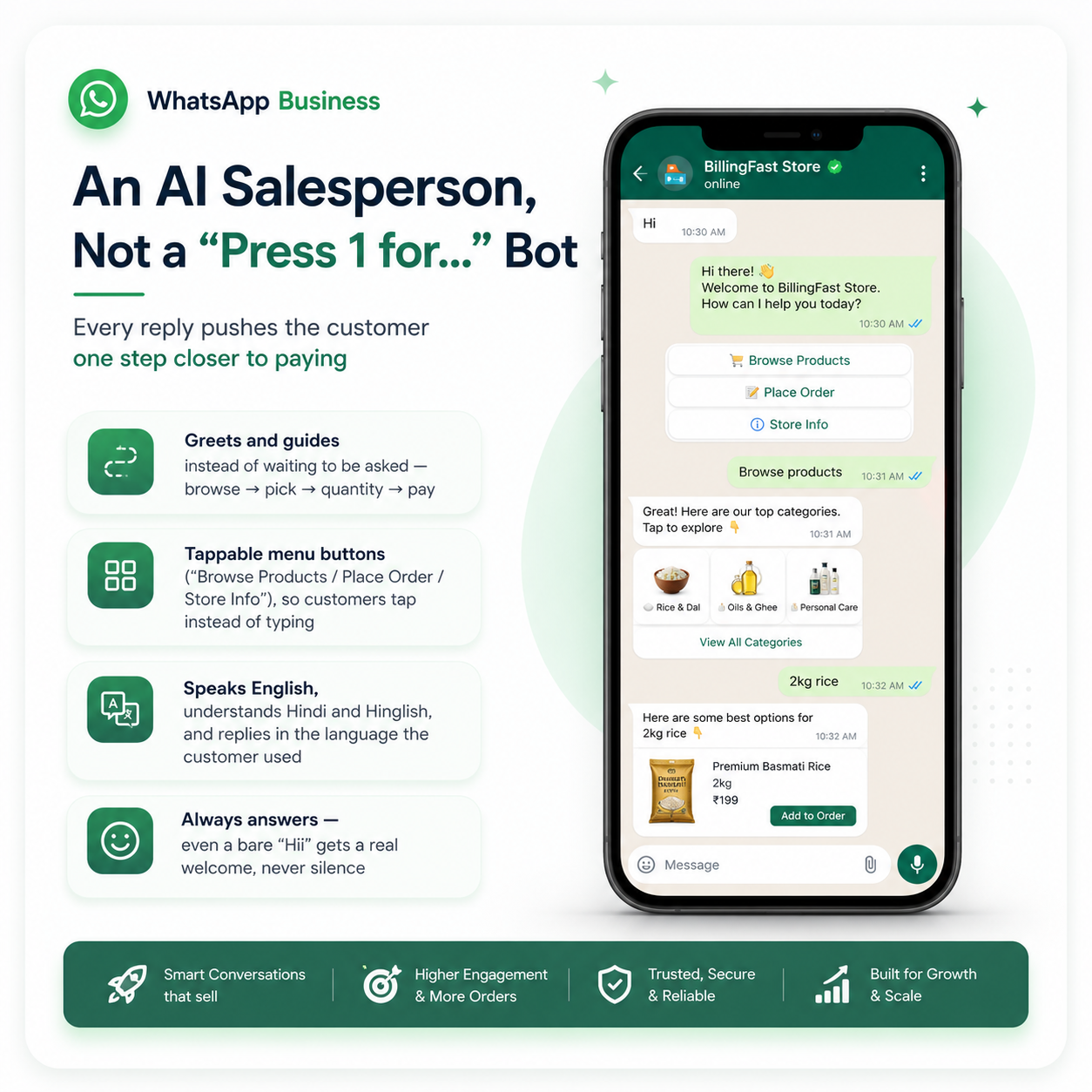
An AI Salesperson, Not a "Press 1 for..." Bot
Every reply pushes the customer one step closer to paying
- Greets and guides instead of waiting to be asked — browse → pick → quantity → pay
- Tappable menu buttons ("Browse Products / Place Order / Store Info"), so customers tap instead of typing
- Speaks English, understands Hindi and Hinglish, and replies in the language the customer used
- Always answers — even a bare "Hii" gets a real welcome, never silence
- Typing indicators and read receipts, so the chat feels human
How the Bot Knows Your Real Prices, Stock and Variants
The single biggest difference between this and a generic chatbot is that it reads from your actual Billing Fast inventory. When a customer asks for "atta", the bot searches your live catalog — real product names, current prices, live stock, and variants — and never invents an item you don't sell. Every result shows the price plus the unit (per kg / piece / pack) and a short description, so nobody has to guess what they're paying for.
It's also variant-aware. Instead of a bare "500g", it shows "Aashirvaad Atta – 500g" with the parent product name attached, so the customer picks the right pack the first time. And if they say "let me see the gulab jamun", the bot sends the actual product photo from your catalog with a caption — the same nudge a good shopkeeper gives when they hold up the item.
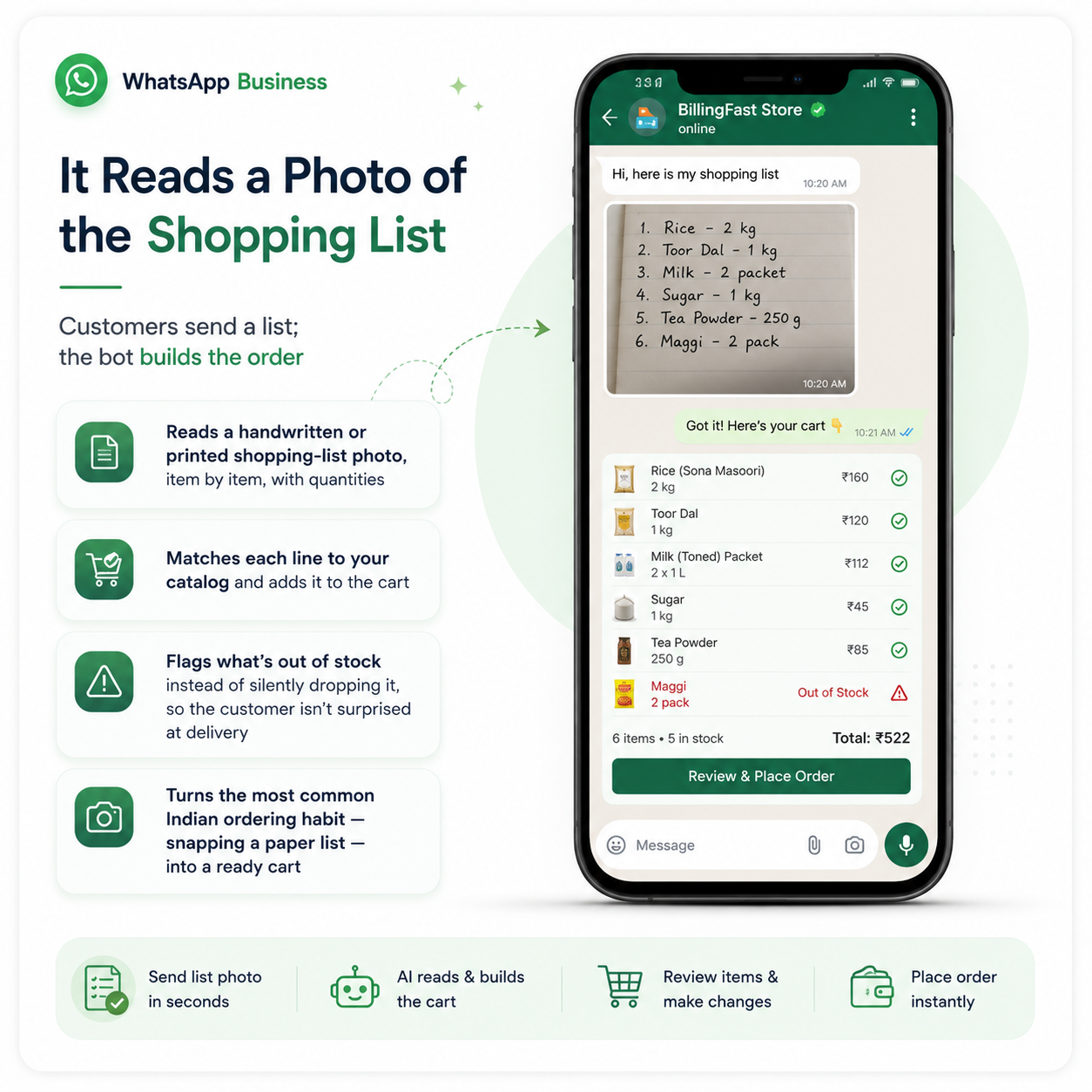
It Reads a Photo of the Shopping List
Customers send a list; the bot builds the order
- Reads a handwritten or printed shopping-list photo, item by item, with quantities
- Matches each line to your catalog and adds it to the cart
- Flags what's out of stock instead of silently dropping it, so the customer isn't surprised at delivery
- Turns the most common Indian ordering habit — snapping a paper list — into a ready cart
The Full Order Flow, Start to Finish
Once the cart is ready, the bot runs the order the way you would. It shows an itemised summary with the total and confirms before placing anything. It asks how the customer wants it — pickup or delivery — and adapts. For delivery it offers your shop's real time slots and hides windows that have already closed for the day. For pickup, if the requested time clashes with a delivery run, it tells the customer the shop is busy and suggests the next free slot, so you're never double-booked.
Address handling is deliberately careful: it asks only for what's needed and never invents or "tidies up" an address it wasn't given. Cancellation has guardrails too, so a stray "no" in the middle of a chat can't wipe out a real order. The result is an order flow that's fast for the customer but safe for you.
Payment and Invoice, Handled Automatically
From "confirm order" to a paid, invoiced sale — inside the chat
- UPI QR generated on confirm, with the exact amount pre-filled
- Pay link and UPI ID sent alongside, so the customer pays however they prefer
- Payment follow-up once the amount is received
- Auto invoice — itemised, with your shop name, items and total — sent right after payment
What You Can Do at a Glance
| What the customer does | What Billing Fast does automatically |
|---|---|
| Sends "Hii" or a random message | Sends a real welcome with tappable menu buttons |
| Asks for a product by name | Searches live catalog, shows price, unit, photo and variant |
| Sends a photo of a shopping list | Reads each item + quantity, builds the cart, flags out-of-stock |
| Says "deliver it" | Offers real delivery slots, hides closed windows, takes address |
| Confirms the order | Generates UPI QR with exact amount + pay link + UPI ID |
| Pays | Confirms payment and sends an itemised invoice |
Turn a Chat Into Marketing You Can Measure
WhatsApp automation isn't only for incoming orders. You can push an approved offer to customers and every order placed off that coupon is attributed back to the promo, so you finally know which offer actually drove sales instead of guessing. To reach customers outside WhatsApp's 24-hour reply window, the system uses Meta-approved message templates, keeping you compliant while you re-engage.
Behind the scenes it stays disciplined. Every inbound and outbound message is logged to your shop's panel, so you have a complete record of each conversation. The bot keeps one conversation memory per customer and remembers context across messages. And because runaway messaging can burn money, per-customer rate limits and a global cap keep spend bounded. If you run more than one outlet, the same bridge is multi-shop aware and routes each customer to the right shop's catalog.
How This Fits With the Rest of Billing Fast
The WhatsApp bot isn't a bolt-on — it runs on the same inventory, pricing, and billing you already use in Billing Fast. Stock it sells is stock it deducts; invoices it sends are real GST-ready bills. If you're just getting your shop online, start with our guide to selling online in India and our kirana store billing software, then let the WhatsApp automation handle the incoming orders. To keep those orders organised as volume grows, pair it with order management software and the best POS billing software for a kirana shop.
Conclusion
Your customers are already on WhatsApp with their order half-typed. The only question is whether anyone replies before they give up. Billing Fast's WhatsApp order automation makes sure someone always does — an AI salesperson that knows your real catalog, reads a shopping-list photo, takes the order, collects UPI, and sends the invoice, without pulling you away from the counter. It's the difference between "we'll get back to you" and a paid, invoiced sale.