What is Billing Fast, and who is it for?
Billing Fast is your all-in-one inventory management and billing solution, perfect for busy Indian
retailers. Whether you run a single shop or multiple stores, Billing Fast helps you create bills,
manage stock, and go online—all from one user-friendly app.
How does Billing Fast differ from traditional billing software?
Many older billing systems are complicated, bulky, and expensive. Billing Fast is fast, simple, and
subscription-based, so you never worry about hidden fees or complex setups. Plus, you can send bills
via WhatsApp and manage online orders easily—benefits most legacy platforms can’t match.
Why did you rebrand from Kirana Fast to Billing Fast?
We wanted a name that reflects our vision of speed and simplicity and appeals to all retailers, not
just kirana shops. “Billing Fast” instantly conveys that we help you bill quickly, no matter what
you sell.
Can Billing Fast be used by any type of retail store?
Absolutely! From grocers and boutiques to electronic stores, Billing Fast fits any retailer’s needs.
If you have specific requests, let us know—we’re here to support your success.
Is Billing Fast suitable for large enterprises as well as small shops?
Yes, Billing Fast is perfect for small shops and medium-sized businesses (up to about 10–12
branches). For extremely large enterprises, some features may not scale, but for efficient growth,
Billing Fast is your best bet.
Do I need any technical background to use Billing Fast?
No. If you can use a smartphone, you can handle Billing Fast. Our interface is designed to be simple
and intuitive.
Which platforms or devices can I use to access Billing Fast?
We support iOS, Android, and desktop browsers (Chrome recommended). Download from the Play Store/App
Store or use our web app—whichever suits you best.
What languages does Billing Fast support?
Currently, English, Hindi, Marathi, and Gujarati are available, with more languages coming soon to
better serve diverse retailers.
Which countries does Billing Fast operate in?
We’re focused on India right now, but we plan to expand internationally. Stay tuned for updates!
What pricing plans do you offer?
We have three flexible plans:
- Lite (₹3,588/year): Unlimited bills & inventory, GST invoicing, a free online
store, 1 admin login.
- Premium (₹7,000/year): Everything in Lite + AI camera entry, multiple stores,
staff management, and loyalty program.
- Ultra (₹9,999/year): Everything in Premium + white-label APK, custom
integrations, and a dedicated account manager.
Do you offer monthly or annual billing options?
Yes! Pay monthly, annually, or even for 5 years at once. We keep it flexible to fit your cash flow.
Can I switch between plans at any time?
You can upgrade anytime. For downgrades, give us a call, and we’ll assist you.
How do I upgrade or downgrade my subscription plan?
Just call our support team, and we’ll handle the process. We want you on the plan that best supports
your store.
Is there a free trial available?
Yes! You get a 3-day free trial. After that, you can choose our monthly plan (as low as ₹600/month
for Lite) before committing long-term.
What happens if I exceed my plan’s limit?
Paid plans have no invoice limits. Free users can make up to 10 invoices to test features before
upgrading.
Do you offer special pricing for nonprofits or schools?
Call our team; we’re happy to discuss custom solutions for worthy causes.
Do you have a money-back guarantee?
We don’t promise refunds, but our free trial and monthly option let you test Billing Fast risk-free.
If technical issues arise, we’ll make it right.
How do I sign up for Billing Fast?
- Download the app (Play Store/App Store) or visit our website.
- Register with your phone number and OTP.
- Enjoy your 3-day free trial.
- Customize your business settings and start billing!
Do I need special hardware like a barcode scanner or printer?
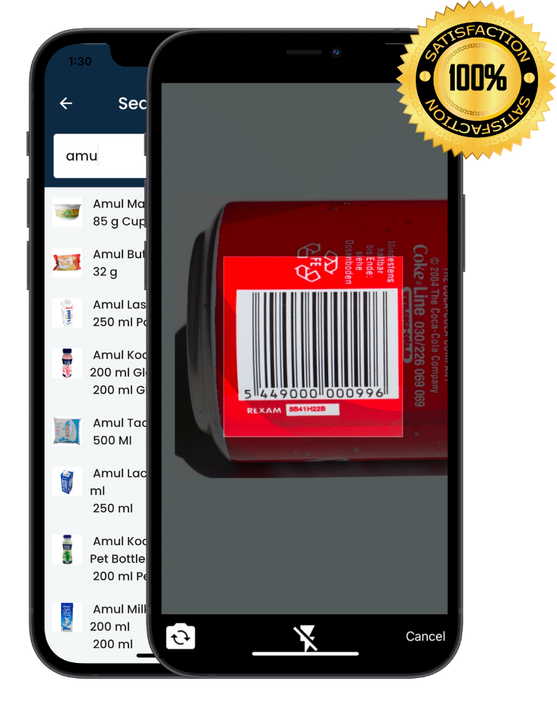
Mobile/Tablet: No special hardware needed. Send bills via WhatsApp and scan barcodes
with your phone’s camera.
Computer: A USB barcode scanner helps if you prefer scanning.
Advanced Accessories: We support weighing scales, cash drawers, etc., for a full
POS setup.
Can Billing Fast integrate with my existing POS hardware?
If your POS runs on Windows PC or Android, install Billing Fast directly. Standalone payment
terminals aren’t supported, but you can mark offline payments as “Paid”.
Is there a setup guide or tutorials?
Yes! Step-by-step tutorials are in-app, plus more tips on YouTube and Instagram.
How long does setup take?
You can start billing immediately. Add products manually, import via Excel, or use our 200K+
preloaded barcodes.
Is Billing Fast cloud-based?
Yes—it’s fully cloud-based. Use Google Chrome on desktop, with internet connection required (works on
slow speeds).
Can I import existing inventory data?
Yes. Export from your old software to Excel, format per our template, and upload—it’s quick and easy.
How do I migrate from another billing system?
Import inventory via Excel. For previous orders, set opening balances manually—no olds bills or
ledgers imported.
Is staff training provided?
We offer video tutorials and remote support. Our team is just a call away for any questions.
Does Billing Fast support multiple users and access levels?
Yes! Premium and Ultra plans let you create roles (Admin, Manager, Billing Agent) with tailored
permissions.
How does Billing Fast handle discounts, loyalty, or coupons?
Discounts: Apply product-wise or bill-wide in a few taps.
Loyalty: Reward customers with points redeemable instantly.
Coupons: Coming soon!
Which payment methods can I record?
Record cash, card, or UPI transactions. Online payment processing is not direct.
How are returns and refunds handled?
We offer a simple Returns & Exchanges workflow with automatic inventory and ledger adjustments.
Does Billing Fast offer real-time analytics?
Yes—get instant snapshots of daily sales, inventory levels, and outstanding balances.
Can I customize invoices or receipts?
Add your logo and choose templates (2-inch, 3-inch, A5, A4). Custom designs available on request.
Does Billing Fast support multiple store locations?
Yes—Premium and Ultra plans support up to 5 locations, with separate data or stock transfers.
Does Billing Fast work offline?
No—real-time data sync requires internet. Slow connections are handled gracefully.
Does Billing Fast include customer/supplier management?
Yes—track customer details (birthdays, balances) and link suppliers for one-tap reorders.
Can I set partial payments?
Absolutely—accept partial payments anytime, with clear outstanding balances in the ledger.
How does loose item billing work?
Integrate with weighing scales, bill by kg/gram/litre, use predefined weights or value-based entry
for quick checkouts.
Can I track credit vs cash sales daily?
Yes—view daily cash collected, credit outstanding, and total sales at a glance.
Does Billing Fast support automated SMS reminders?
Not yet—you can export numbers for third-party tools. Stay tuned for updates!
Does Billing Fast handle multiple GST rates in one bill?
Yes—mix 5%, 12%, 18%, or 28% rates on a single invoice seamlessly.
Does Billing Fast handle staff attendance or commissions?
Attendance: Not yet.
Commissions: Set product margins to calculate staff commissions.
Is negative stock billing allowed?
Yes—sell even if inventory isn’t updated to avoid checkout delays.
Can I print barcodes or labels directly?
Yes—print from mobile with Bluetooth printer or from PC-based barcode printer.
Inventory Management Highlights
- Multiple Locations: Track inventory for up to 5 stores.
- Low Stock Alerts: Customizable notifications when stock is low.
- Variants & Batches: Manage sizes, colors, batch numbers & expiries.
- Valuation Reports: View stock value vs selling price.
- Real-Time Sync: All updates reflect instantly.
Does Billing Fast have its own payment gateway?
No—but you can record cash, card, or UPI transactions without extra fees.
Do you connect to my bank automatically?
No direct integration; reconcile deposits/withdrawals manually for clarity.
Does Billing Fast integrate with eCommerce platforms?
We sync your online store (built-in) in real time but don’t directly integrate with
Shopify/WooCommerce.
How do UPI refunds work?
Refund via your UPI app, then mark as return/refund in Billing Fast—no double charging.
Do you support recurring payments?
No—manual billing keeps you in full control.
How secure is Billing Fast?
Hosted on Google Cloud, OTP-based logins, and no sensitive payment data stored.
Is Billing Fast GST-compliant?
We don’t generate e-way bills or full e-invoices yet but are enhancing compliance features.
Can I use Billing Fast on slow internet?
Yes—basic connection suffices; reconnect to continue billing if disconnected.
Do you offer a daily closing report?
Yes—get daily sales, payments, and inventory changes for easy reconciliation.
What customer support is available?
Phone support, in-app help, and extensive video tutorials for fast assistance.
Do you have a referral or affiliate program?
Yes—earn incentives by referring others to Billing Fast. Contact our team for details.
Is there a public API?
Not currently. Reach out if you need custom integration—let’s discuss your requirements.
Does Billing Fast support restaurant features?
No—we focus exclusively on retail billing workflows.
When will e-way bills or advanced GST filings be available?
Coming soon! We’re constantly adding features—stay tuned for updates.